
这里是对 sakurairo 2.0 主题 的一些修正以及应用.你也可以在底部留言 想修改/修正的方法..
不定时更新
开始
消除半屏曲面
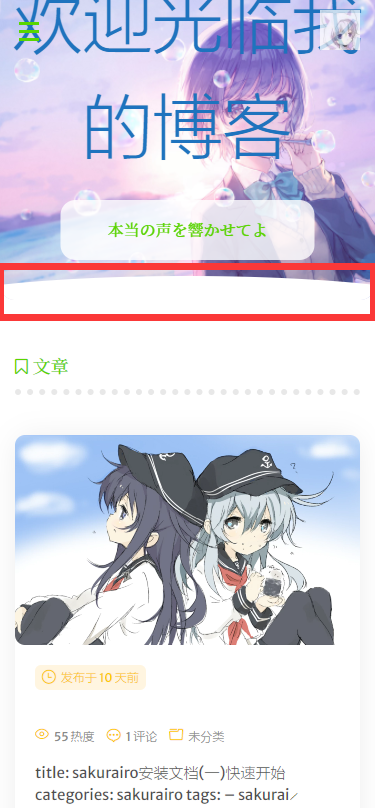
很多人用半屏图片logo,觉得那个小山波不好像,要弄直。
复制下面代码,放入博客自定义CSS保存即可。
.headertop-bar::after {width: 0% ; } |
代码自动换行
在主题内,写的代码如果过长就会被溢出,遮挡了看不见..
下面的代码就是让代码如果过长就自动换行。同样复制代码
翻入博客的自定义CSS位置保存即可。
pre[class*="language-"].line-numbers > code { |
图片点击放大(支持外链)
sakura,跟sakurairo主题已经引入css,跟js,只需要最后一步即可。
在header.php文件的<head>下添加下面css链接<!-- 图片放大 -->
<link rel="stylesheet" href="https://cdn.jsdelivr.net/gh/fancyapps/fancybox@3.5.7/dist/jquery.fancybox.min.css" />- 然后在
footer.php文件最后的</boby>的上面添加JS链接<script src="https://cdn.jsdelivr.net/gh/fancyapps/fancybox@3.5.7/dist/jquery.fancybox.min.js"></script>
- 最后,打开
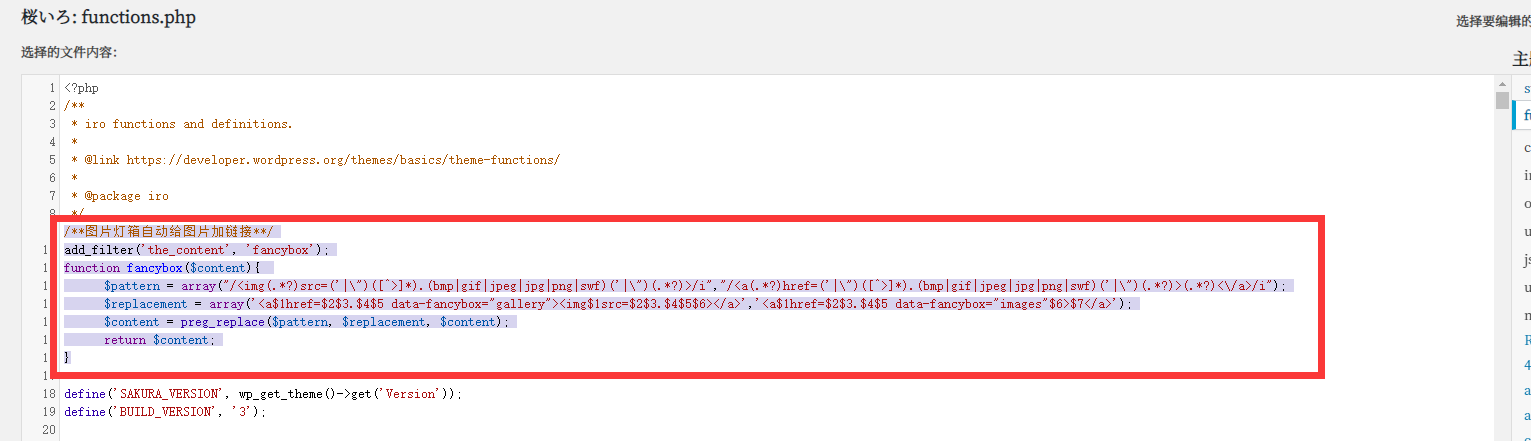
functions.php文件。在<?php中添加下面代码/**图片灯箱自动给图片加链接**/
add_filter('the_content', 'fancybox');
function fancybox($content){
$pattern = array("/<img(.*?)src=('|\")([^>]*).(bmp|gif|jpeg|jpg|png|swf)('|\")(.*?)>/i","/<a(.*?)href=('|\")([^>]*).(bmp|gif|jpeg|jpg|png|swf)('|\")(.*?)>(.*?)<\/a>/i");
$replacement = array('<a$1href=$2$3.$4$5 data-fancybox="gallery"><img$1src=$2$3.$4$5$6></a>','<a$1href=$2$3.$4$5 data-fancybox="images"$6>$7</a>');
$content = preg_replace($pattern, $replacement, $content);
return $content;
}
保存好之后,刷新网站.点击看看,是不是可以放大了。添加自定义页脚信息
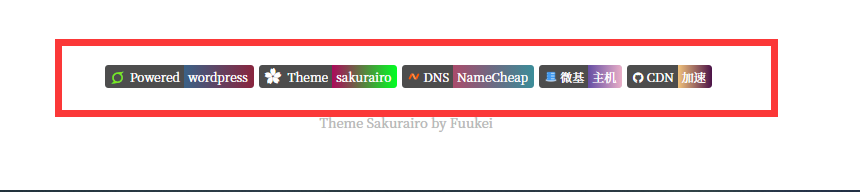
修改下面代码为你自己的个人信息复制代码,保存在后台-<div class="github-badge"><a style="color:#fff" rel="external nofollow noopener noreferrer" href="https://wordpress.com/" target="_blank" title="由 wordpress 强力驱动" data-pjax-state=""><span class="badge-subject"><i class="fa fa-superpowers" style="color:#7de61d"></i> Powered</span><span class="badge-value bg-blue">wordpress</span></a></div><div class="github-badge"><a style="color:#fff" rel="external nofollow noopener noreferrer" href="https://github.com/mirai-mamori/Sakurairo" target="_blank" title="sakurairo主题" data-pjax-state=""><span class="badge-subject"><i class="iconfont icon-sakura rotating" style="color:#fff"></i> Theme</span><span class="badge-value bg-red">sakurairo</span></a></div><div class="github-badge"><a style="color:#fff" rel="external nofollow noopener noreferrer" href="https://www.namecheap.com/" target="_blank" title="namecheap提供域名相关服务" data-pjax-state=""><span class="badge-subject"><img src="https://cdn.jsdelivr.net/gh/flurrychan/cdn/img/hexo/img/namecheap.svg" alt="图片" style="width:12px;height:11px" data-ll-status="loading" class="entered loading"> DNS</span><span class="badge-value bg-DNS">NameCheap</span></a></div><div class="github-badge"><a style="color:#fff" rel="external nofollow noopener noreferrer" href="https://idc.wiki/aff.php?aff=956" target="_blank" title="微基主机服务" data-pjax-state=""><span class="badge-subject"><img src="https://cdn.jsdelivr.net/gh/flurrychan/cdn/img/hexo/img/wiki.ico" alt="图片" style="width:12px;height:11px" data-ll-status="loading" class="entered loading"> 微基</span><span class="badge-value bg-blueviolet">主机</span></a></div><div class="github-badge"><a style="color:#fff" rel="external nofollow noopener noreferrer" href="https://aabbj.com" target="_blank" title="CDN加速" data-pjax-state=""><span class="badge-subject"><i class="fa fa-github" style="color:#fff"></i> CDN</span><span class="badge-value bg-orange">加速</span></a></div>
iro主题设置-全局设置下的页尾设置里面的页尾信息当中
然后复制下面CSS代码到后台-外观-自定义-额外CSS当中。美哒哒的页脚就出来了。XD/*底部信息*/
.github-badge {
margin-left: 5px;
display: inline-block;
border-radius: 4px;
text-shadow: none;
color: #fff;
line-height: 15px;
background-color: #abbac3;
margin-bottom: 5px;
font-size: 12px;
}
.github-badge .badge-subject {
display: inline-block;
background-color: #4d4d4d;
padding: 4px 4px 4px 6px;
border-top-left-radius: 4px;
border-bottom-left-radius: 4px;
}
.github-badge .badge-value {
display: inline-block;
padding: 4px 6px 4px 4px;
border-top-right-radius: 4px;
border-bottom-right-radius: 4px;
}
.github-badge .bg-blue {
background: linear-gradient(to right, #3a6186, #89253e);
}
.github-badge .bg-red {
background: linear-gradient(to right, #ac0a5b, #00ff22);
}
.github-badge .bg-brightgreen {
background: linear-gradient(to right, #fc5c7d, #6a82fb);
}
.github-badge .bg-orange {
background: linear-gradient(to right, #f0c27b, #4b1248);
}
.github-badge .bg-gradient {
background: linear-gradient(to right, #3ca5f6, #a86af9);
}
.github-badge .bg-blueviolet {
background: linear-gradient(to right, #654ea3, #eaafc8);
}
.github-badge .bg-DNS {
background: linear-gradient(to right, #aa4b6b, #6b6b83, #3b8d99);
}
相关推荐





评论